AI Coding Security Is Now A Board-Level Risk
Last quarter, a seed-stage SaaS founder discovered that an AI-assisted workflow had committed a production API key to a public repository.
The team was moving fast. The assistant had been useful. It understood the codebase, followed the team’s style, and helped ship features.
It had also been given broad access to the local workspace, including files that should never have been available to an agent.
The leak cost the company a customer contract, emergency engineering time, and credibility with a larger prospect that was already asking security questions.
That is the new AI coding security problem.
AI coding assistants are not just productivity tools.
They are high-privilege actors inside your engineering environment.
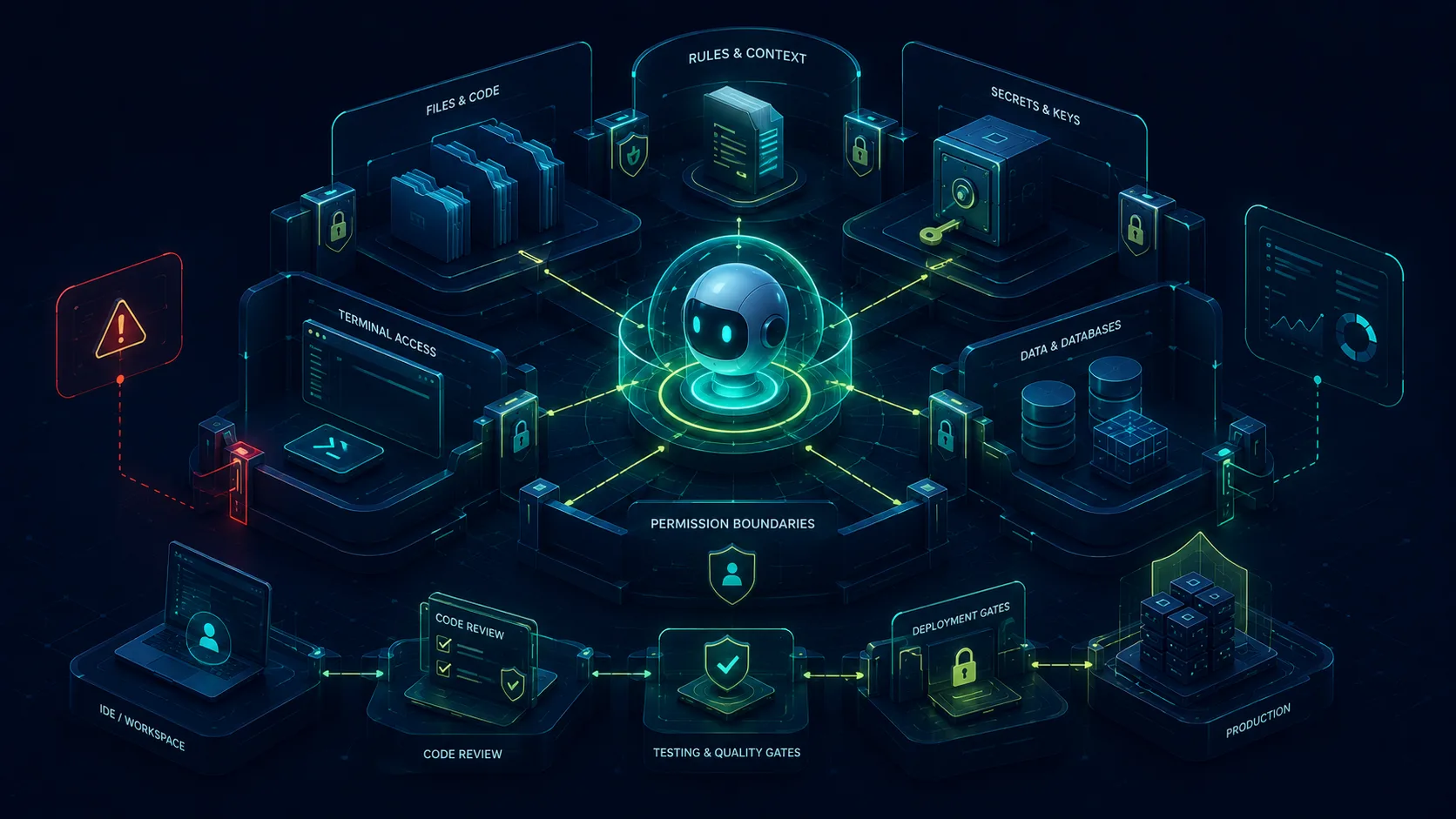
They can read files. They can modify code. They can call tools. They can interact with terminals. They can touch configuration. In some workflows, they can influence deployment paths.
The question is no longer only “Did the AI write good code?”
The question is also “What access did the AI have while writing it?”
The new attack surface
Traditional software security focuses on application code, infrastructure, dependencies, secrets, and user data.
AI-assisted development adds another layer:
- Prompt injection inside development tools.
- Malicious instructions hidden in files.
- Compromised agent skills or extensions.
- Secrets leaked through AI-assisted commits.
- MCP configuration exposure.
- Rules files that instruct the model in ways humans may not notice.
- Permission bypasses that give agents too much autonomy.
This matters because AI assistants operate close to sensitive systems. They are not isolated chatbots when connected to files, terminals, APIs, and internal tools.
They become part of the software supply chain.
A quick glossary for non-security readers
You do not need to become a security engineer to understand the risk.
But you do need to know the basic trust boundary:
- Prompt injection: hidden instructions that try to manipulate the AI into doing something unsafe.
- Rules files: instruction files that shape how the AI behaves in a project.
- Agent skills or extensions: add-ons that give the AI more capabilities.
- MCP servers: tool connections that let AI systems inspect or act on application context.
- Secret leakage: exposing API keys, tokens, passwords, or credentials through files, commits, logs, or tool output.
Each of these can be useful.
Each of these can also become a security risk if no one reviews what the AI can access and change.
Productivity without guardrails creates risk
The same features that make AI coding powerful also make it risky.
Context access helps the agent understand the app. It can also expose sensitive information.
Tool access helps the agent inspect and modify the system. It can also execute the wrong command.
Rules files help enforce engineering standards. They can also become hidden instruction surfaces.
Extensions and skills help agents do more. They can also introduce supply-chain risk.
Founders should not ignore this because the product is early. Early-stage products often have weaker process, fewer reviews, and more direct access to production systems.
That is exactly when guardrails matter.
For operators and SMB buyers, the concern is similar. If your agency or contractor is using AI coding tools to build your portal, workflow, or customer-facing app, you still need to know how that work is being reviewed.
If the product touches customer data, payment details, patient information, donor records, internal documents, or private business logic, the business owns the consequence even if a vendor wrote the code.
What enforceable security looks like in an AI workflow
AI coding security is not one checklist at the end of a project.
It needs to be part of the workflow from the beginning.
Enforceable controls look like this:
- Agent permission scopes are defined before code is written. Every agent gets an explicit boundary for files, commands, and tools.
- Agent-authored changes pass mandatory human review. No AI-generated diff should reach production on its own authority.
- MCP and tool configurations are audited, not trusted. Tool access should be reviewed when it is added and when it changes.
- Secrets are scanned before commit. API keys, tokens, passwords, and credentials should not be available in plain text or committed by accident.
- Rules files are version-controlled and reviewed like code. If a file can influence the agent, it belongs inside the review process.
- Hidden instructions are checked. Teams should watch for invisible characters, copied community rules, encoded blobs, and unexplained instruction changes.
- Production deployment has a human approval gate. AI can help prepare a release, but it should not silently bypass review.
- One person owns the agent trust boundary. Not “the team” in general, but a named person responsible for permissions, tools, secrets, and review gates.
The goal is not to make AI useless by locking everything down.
The goal is to give AI enough access to be helpful without giving it enough access to become dangerous.
Rules files need review too
Many AI coding tools use instruction files to shape model behavior.
These files are useful. They can enforce style, framework conventions, security rules, and project-specific guidance.
But they are also part of the trust boundary.
If a rules file can influence an agent, it needs to be reviewed like code.
That means:
- Keep rules files visible and version-controlled.
- Review changes carefully.
- Watch for hidden or invisible characters.
- Do not blindly copy community instruction files.
- Keep security guidance explicit.
An AI coding workflow is only as trustworthy as the instructions and tools it depends on.
Secret management becomes more important
AI agents should not need broad access to secrets.
They may need to understand configuration shape, but they do not need production credentials sitting in plain text inside the workspace.
For AI-assisted teams, secret management should include:
- Avoiding committed
.envfiles. - Using secret managers where appropriate.
- Running pre-commit secret scanning.
- Limiting local credentials.
- Separating development, staging, and production access.
- Auditing MCP and tool configuration files.
The more autonomous the workflow becomes, the more important least privilege becomes.
What this looks like by industry
The risk is not abstract.
In healthcare, an AI-assisted workflow that exposes patient data can create HIPAA and trust problems before the product ever scales.
In e-commerce, leaked payment processor keys or customer records can create fraud, chargebacks, and vendor-review issues.
In nonprofits, donor data, grant documents, and internal financial records often sit in systems that were never designed for AI-assisted access.
In logistics or local services, a contractor with broad tool access can accidentally affect dispatch, customer notifications, internal schedules, or operational data.
For startups, the same mistake can become an investor diligence problem. A security incident that looks small in a prototype can become a blocker when an enterprise customer asks for evidence of access control, auditability, and deployment review.
Questions to ask your team or vendor
If your internal team, contractor, or agency is using AI coding tools, ask these questions before the workflow accelerates:
- What files can the agent read?
- What commands can the agent run?
- Can the agent access secrets, environment variables, API keys, or production credentials?
- Which tools, MCP servers, skills, or extensions are approved?
- Are rules files version-controlled and reviewed?
- Is secret scanning running before commit?
- Who reviews AI-generated code before it merges?
- Can AI-authored changes reach production without human approval?
- Who owns the agent permission model?
- What happens if the agent suggests insecure code or exposes sensitive data?
These questions convert a vague security fear into an actionable review.
Why this matters for AI MVPs
Founders often think security becomes important later.
For AI products, later can be too late.
If the MVP handles customer data, uploads, internal documents, workflows, API keys, payments, or private business logic, then security is already relevant.
The goal is not enterprise bureaucracy.
The goal is avoiding avoidable mistakes:
- Do not leak secrets.
- Do not let agents run dangerous commands without review.
- Do not install untrusted agent skills.
- Do not let generated code bypass authorization.
- Do not ship AI workflows no one can audit.
This is what separates a prototype from a product that can earn trust.
The Somnio approach
Our view is simple: AI velocity only works when paired with verification.
That means AI-assisted development should include security review, architecture review, and implementation review as part of the normal delivery loop.
AI can help write code. It can also help review code. But the workflow still needs human accountability and clear permissions.
The best AI teams will not be the ones that remove all friction.
They will be the ones that remove the wrong friction while preserving the right controls.
In an AI MVP Risk & Architecture Call, we review the product workflow, agent permissions, tool configuration, secret-handling approach, review gates, and deployment path before AI-assisted code becomes production risk.
Before you give agents more access
If you are using AI coding tools or planning an AI MVP, security should be discussed before the build accelerates.
Ask what the agent can access, what it can change, and how its output will be reviewed.
Book an AI MVP Risk & Architecture Call to review what your agents can access, how secrets and tools are configured, and which approval gates need to exist before AI-assisted code reaches production.
Related resources
- AI MVP development
- AI-assisted software development process
- AI-native engineering workflow
- Architecture consulting
- Development timeline estimator